Futuristic Heads-Up Display UX Concept
Role:
Automotive UX, UI Design
Tools:
Figma, Photoshop, After Effects
Date:
January 2026

Why did automotive UX shift from prioritizing driver safety to competing for the largest screen?
This is a question drivers (including myself) ask regularly, and yet the industry continues to keep moving forward with increasing screen real estate. While oversized screens may look impressive in showrooms, they fundamentally compromise the driving experience by forcing drivers to divert their attention from the road.
A driver-centric interface eliminates the need to look away. This concept aims to tackle this exact challenge based on advanced HUD tech and holographic films to overlay contextual UI with reality, proving that compelling visual design doesn't have to come at the cost of safety.
Drawing from my own experience of driving in one of the most car-centric cities on the planet (Los Angeles) over the past few years, I explored some real-world driving scenarios where a system like this would be useful, and conceptualized how UI can provide real-time assistance without overwhelming the driver.

Autonomous Driving
During my time at Audi Automated Driving Development, I benchmarked vehicles with advanced autonomous driving features and observed that in safety-critical scenarios, it was often unclear whether the driver or the vehicle was in control. This ambiguity increases cognitive load and causes confusion at moments where clarity is essential.
The goal here was to clearly communicate autonomous driving modes while keeping the driver continuously informed and engaged. Using the color green consistently to indicate auto-drive, along with target vehicle tracking, braking and distance cues, color-coded navigation carpets, and minimal text indicators, the system provides a unified visual language to communicate with the driver.
The result is a concept that keeps the driver in loop by coordinating color, depth, and motion. The HUD builds a mental model of system behavior that is intuitive and legible, providing a user experience that reduces confusion, builds driver confidence, and allows drivers to understand vehicle intent at a glance.

Pedestrian, Cyclist & Vehicle Detection
Pedestrians, cyclists, and surrounding vehicles can often enter the driving path unexpectedly, especially in urban traffic scenarios. The goal of this feature was to make potential conflicts immediately understandable while keeping the driver focused ahead.
Using color-coded alert boxes such as yellow for awareness and red for immediate risk, the HUD highlights people and vehicles in the driver's path.
When obstacles are detected, the driving path automatically adjusts to reflect the safest route, helping drivers not only understand what's in the way, but also how to navigate around it.


Crosswalk Detection
In many cities, pedestrian crossings are poorly marked or entirely absent, making it difficult for drivers to anticipate where people may cross the road. The goal of this feature was to improve awareness by providing crossings wherever pedestrian movement is detected, not just where infrastructure exists.
By visually marking crossing zones and emphasizing pedestrians directly in the driver's field of view, the system helps draw attention to potential risks before it is too late.

Puddle & Pothole Detection
In addition to people, road surface hazards such as puddles and potholes are often hard to spot in time, especially in low light and wet conditions. This feature visualizes these hazards ahead of the vehicle and adjusts the driving path accordingly, allowing the driver to modify speed or trajectory early. By providing this guidance, the system reduces the chances of hydroplaning, ending up with a flat tire, or sudden evasive maneuvers that could lead to an accident.

Real-time Weather Updates
Changing weather and lighting conditions can directly impact safety as drivers often do not have enough time to react or adjust their plans. The goal here was to make upcoming weather conditions visible and easier to anticipate.
By visualizing rain, snow, along with sunset and sunrise indicators, the HUD helps the driver understand what's coming before they encounter it. This provides time for better preparation, calmer decision-making, and the ability to change routes if conditions will become challenging or reschedule plans to accommodate the weather.
Parking Assistance
Reading parking signs in dense urban streets can be confusing, and misinterpreting restrictions leads to stress or worse, parking violations. The goal here was to communicate both the signs and available spots clearly to the driver.
The HUD first detects and translates parking signs, clarifying restrictions and time limits. Once a valid spot is identified, the system highlights it on the road with two overlays: a green box indicating where the driver should position the vehicle, while a white box shows the spot where the car will automatically park. This visual guidance ensures the driver knows exactly what to do and where to stop, allowing the parking system to engage smoothly.
Combining clear guidance with intuitive visual cues makes parking in busy urban environments easy.

Traffic Light, Stop Sign Detection & Destination Markers
We often face situations where traffic lights and stop signs are obscured, located around blind corners, or in high-clutter environments. Missing these critical signs directly leads to unsafe driving and accidents. The goal of this feature is to provide situational awareness by clearly signaling the state of traffic lights and stop signs in the vehicle's driving path.
The HUD emphasizes signage in the driver's field of view and also displays a stop line for stop signs, allowing anticipation of stops and light changes without diverting attention. This visual guidance provides clarity and enhances overall confidence with the vehicle in both automated and manual driving scenarios. Additionally, point of interest and destination markers are spatially represented, avoiding the need to look at the map to identify where to stop.


Track Assist Mode
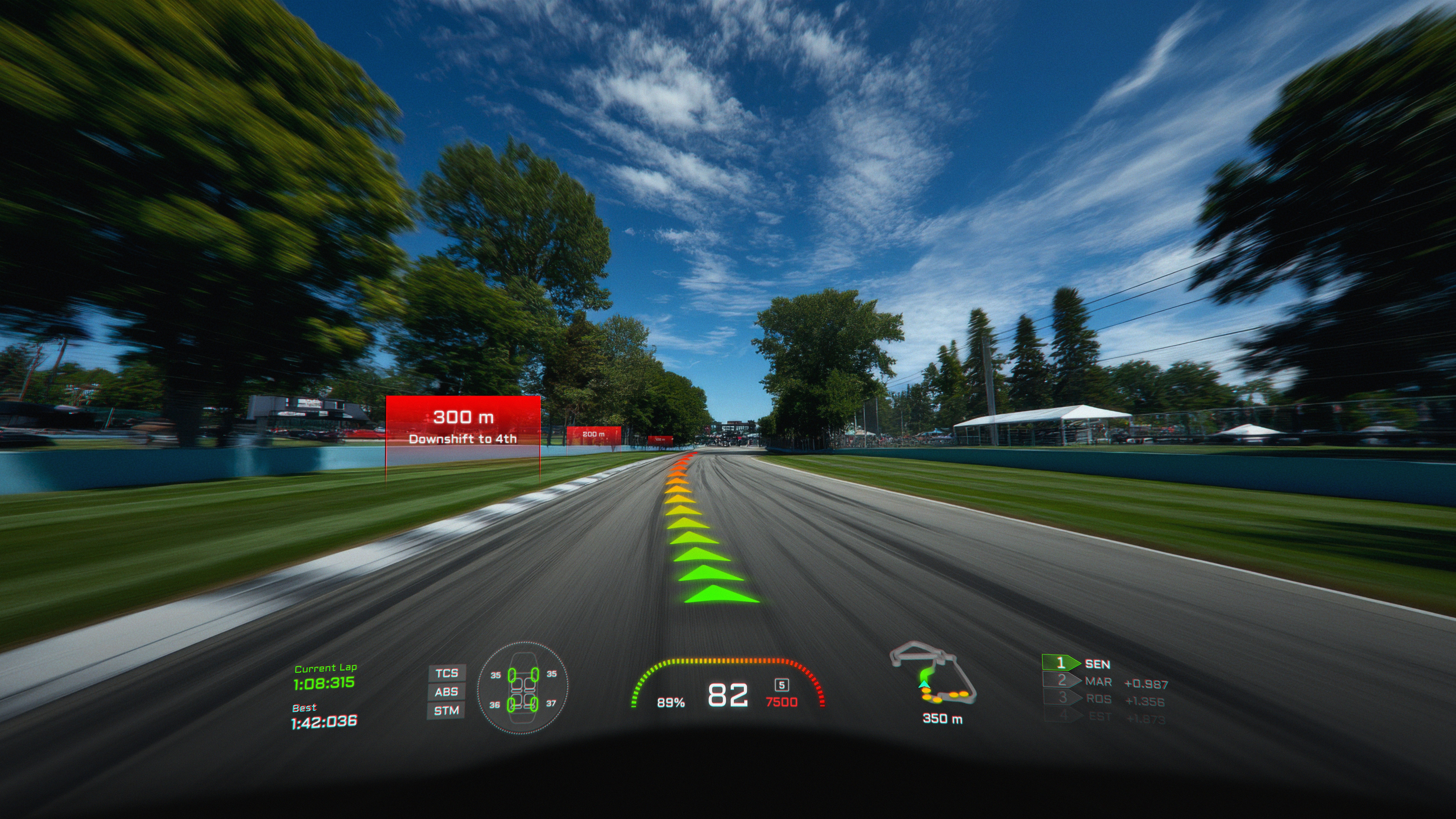
For budding enthusiasts and professionals, track driving requires attention to braking points, ideal driving lines, and vehicle dynamics as even minor misjudgments can impact safety and performance.
The goal for this mode is to provide drivers with real-time guidance that communicates braking zones, vehicle positioning, and track info. The system visually indicates upcoming corners, optimal braking areas, and shifting cues to build confidence and get the most out of your track time.
Student Driving Mode
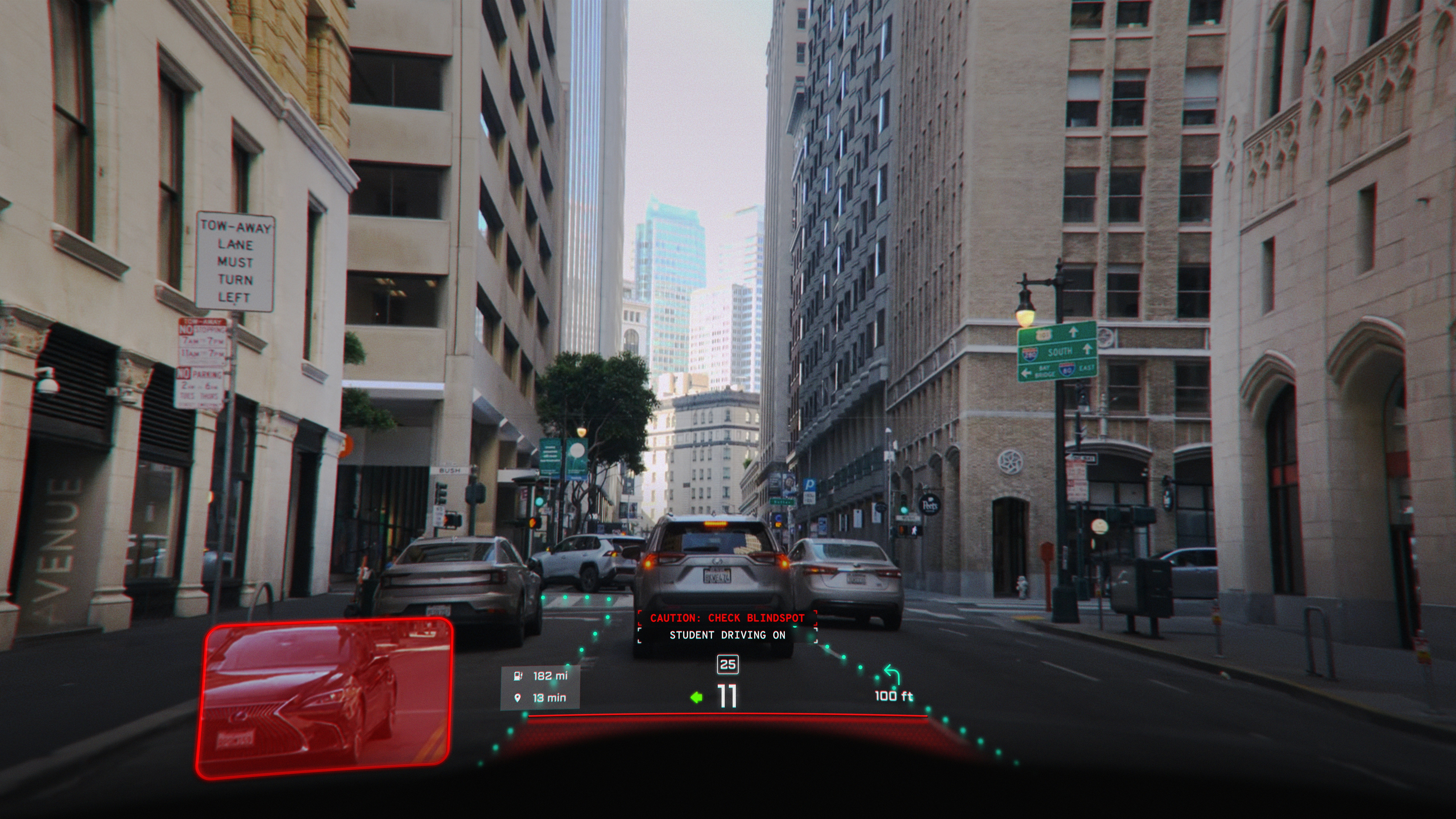
A major issue faced by new or nervous drivers is that the road and traffic can feel unpredictable and overwhelming, leading to hesitation, missed signals, and reduced confidence in driving.
The goal of the student driving mode is to provide additional guidance that adapts and tailors according to the driver's experience level. By highlighting lane positioning, safe following distance to the vehicle ahead, and blind spots which are visually represented on the HUD when turn signals are activated, the system acts as a supportive co-pilot. The guidance system adapts in real time to driver behavior, gradually reducing intervention as confidence grows.
The result is a friendly user experience that builds trust and skill, creating a learning environment where beginner drivers can safely focus on developing intuition, mastering vehicle control, and gaining confidence behind the wheel.